

I run two Claude Code subscriptions: one through work, one for personal projects. For a while, my workflow when switching between them was to log out of one account and log in to the other. That got old fast, so I built claudenv.
The Mechanism
Out of the box, Claude Code reads its configuration and credentials from a directory specified by the CLAUDE_CONFIG_DIR environment variable. When that variable is unset, it defaults to ~/.claude. That single fact is the entire foundation of how claudenv works.
claudenv creates named directories under ~/.claudenv/envs/<name>/. Activating an environment sets CLAUDE_CONFIG_DIR to that directory. Deactivating it restores the original value. Each directory is a fully independent config root: separate credentials, separate CLAUDE.md, separate hooks, separate skills. Claude Code reads whichever one CLAUDE_CONFIG_DIR points to and has no visibility into the others.
The implementation is a shell function, not a subprocess. That distinction matters. A subprocess cannot export environment variables into the parent shell; only a function running in the current shell context can. This is the same reason nvm, virtualenv, and jenv all work as sourced shell functions. claudenv follows the same pattern.
Installation
curl -o- https://raw.githubusercontent.com/1shooperman/claude-env/main/install.sh | sh
Or, for a specific version with SHA256 integrity verification:
curl -o- https://github.com/1shooperman/claude-env/releases/download/v0.1.2/install.sh | sh
The installer downloads claudenv.sh to ~/.claudenv/ and wires it into your shell profile with a source line. Piped installs (through curl or wget) detect that stdin is not a terminal and skip the interactive profile prompt; the installer prints the two lines to add manually. After sourcing, the claudenv command is available in any new shell.
oh-my-zsh users can skip the manual source line by symlinking into ~/.oh-my-zsh/custom/:
ln -s "$HOME/.claudenv/claudenv.sh" "$HOME/.oh-my-zsh/custom/claudenv.zsh"
oh-my-zsh sources any .zsh file in that directory automatically.
Usage
Create a new environment:
claudenv config work
That creates ~/.claudenv/envs/work/. At this point the directory is empty. You activate it, then run claude and authenticate. The credentials Claude Code writes go into ~/.claudenv/envs/work/ and stay there. Your other environments are unaffected.
claudenv work          # activate
claudenv list          # show all envs; * marks the active one
claudenv deactivate    # restore original CLAUDE_CONFIG_DIR
claudenv remove work   # delete the directory after confirming
Running claudenv with no arguments opens an interactive picker when you have more than one environment configured.
The reserved default environment maps to ~/.claude rather than a claudenv-managed directory. Activating it is equivalent to unsetting CLAUDE_CONFIG_DIR, which means it picks up whatever credentials and config already exist in your original Claude Code home.
Staying Logged In Through Outages
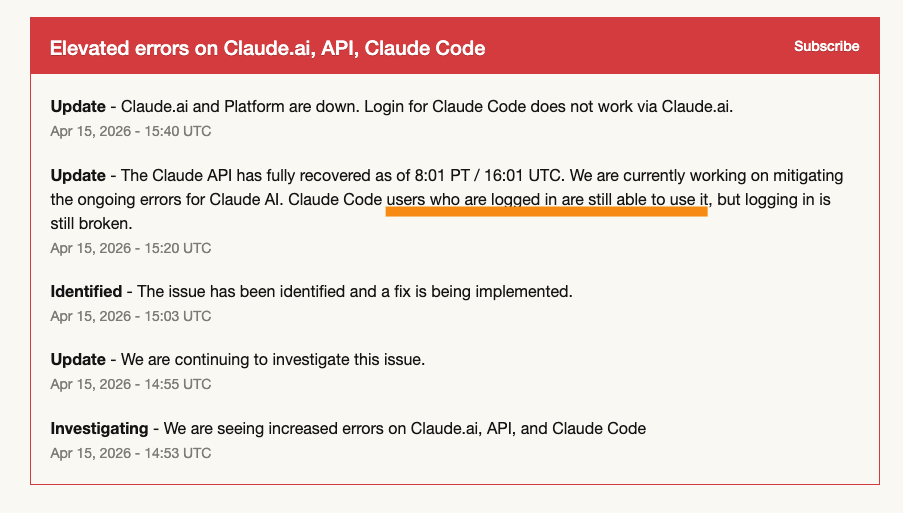
Claude Code's login flow requires hitting Anthropic's auth endpoints. When those are unavailable, even users who are already authenticated can get bounced to a login screen if their session needs refreshing.
My old habit of logging out between account switches made this worse. Once logged out, there is nothing to recover from if login is broken. With claudenv, I stay authenticated in both environments simultaneously. The credentials in each directory are independent, and switching between them does not touch either set. On April 15, 2026, Claude Code's login was broken but I could still work from both environments.
Prompt Integration
When an environment is active, claudenv prefixes your shell prompt with the environment name:
(work) ~ $
For plain bash and zsh, it saves the current PS1 and prepends the prefix directly. Deactivating restores the saved value.
oh-my-zsh themes rebuild PROMPT on every command via precmd hooks, which would overwrite any direct modification to PS1. claudenv handles this by registering its own precmd hook through add-zsh-hook. The hook runs after the theme's precmd, checks whether the prefix is already present, and prepends it if not. The guard prevents double-prefixing when a theme does not rebuild PROMPT on every render.
One known gap: Powerlevel10k uses its own async rendering pipeline that does not go through the standard precmd mechanism. The add-zsh-hook approach does not integrate cleanly with it. There is an open issue tracking this.
Shared Configuration with Selective Overrides
Each environment directory behaves like a complete ~/.claude root. That means you can put a CLAUDE.md, hooks, and skills directly in each environment directory, and they will apply only when that environment is active.
If you want several environments to share the same base configuration, you can symlink those files to a common directory:
ln -s ~/claude-shared/CLAUDE.md ~/.claudenv/envs/work/CLAUDE.md
ln -s ~/claude-shared/hooks      ~/.claudenv/envs/work/hooks
This works as long as you want the environments to stay in sync. If you want to diverge, replace the symlink with a copy and edit from there.
A/B Testing Prompt and Configuration Changes
This turned out to be a more useful pattern than I expected. Because each environment is an independent config root, you can create two environments that authenticate with the same Claude account but carry different CLAUDE.md files, different hooks, or different skills. Running the same task in each environment lets you observe behavioral differences directly.
For example: create envs/prompt-a and envs/prompt-b, write two versions of a CLAUDE.md with different instruction phrasing, and work through the same task in each. The model is identical; the only variable is the configuration. This is more controlled than editing your single config and trying to remember what changed.
The same applies to hooks. If you are evaluating whether a particular post-tool hook actually improves output consistency, you can run it isolated in one environment while your normal environment stays unchanged.
To break a shared symlink and make the configuration specific to one environment:
cp --remove-destination ~/claude-shared/CLAUDE.md ~/.claudenv/envs/prompt-b/CLAUDE.md
Now prompt-b has its own copy to modify independently.
What claudenv Does Not Do
claudenv config creates the environment directory. It does not authenticate. After creating an environment and activating it, you run claude and go through the login flow the same way you would on a fresh machine. The credentials that flow writes are stored in the active environment's directory. This is a deliberate separation: claudenv manages which directory Claude Code uses; authentication is Claude Code's responsibility.
There is no support for WSL or Windows yet. The tool targets macOS with bash 3.2+ and zsh (including oh-my-zsh). Fish shell uses different config syntax and would need a separate implementation; contributions are welcome. The Windows roadmap is tracked in the open issues.
The Code
The entire tool is one shell script: claudenv.sh, about 300 lines including comments. There is no build step and no runtime dependencies beyond bash or zsh. The test suite runs under bats and covers activation, deactivation, environment switching, the stash-and-restore invariant for CLAUDE_CONFIG_DIR, and the config/remove/uninstall commands.
The core invariant the code enforces: _CLAUDENV_OLD_CLAUDE_CONFIG_DIR always holds the value of CLAUDE_CONFIG_DIR from before claudenv was ever activated, not an intermediate claudenv-managed value. When you switch directly from one environment to another without an explicit deactivate, the code deactivates silently first, which restores that original value before stashing it again for the new activation. This prevents the stash from accumulating claudenv-managed paths across switches.
The repository is at github.com/1shooperman/claude-env.